3 Rule Processing
3.1 Normal Rules
Normal rules are rules which do not have a further keyword in the event line. These rules have a fixedly defined kind of processing that is described in the following.
These objects to which rules can be defined have an internal hierarchy. A visible object (instance) can be based on a model which itself can be derived directly from the corresponding default. This object hierarchy plays an important role when inheriting attributes or rules. Please note that these hierarchy steps/levels may not be mixed up with the parent-child-relation that usually does not have any influence on the inheritance of attributes and rules.
If normal rules are defined for different hierarchy levels, rules that are defined on a lower hierarchy level will apply, but the rest will be ignored (as is the case with attributes). If rules are defined for an object, the corresponding model or default, these rules will only apply to the object. Those rules which were defined for the model or the default do not apply because they are minor to the object rules. In this case the rules behave identically with the attributes.
Since this behavior is too rigid for the rule processing, additional rules can be executed by using further keywords. Such keywords are described in the following chapters.
3.2 before Rules
With the keyword before rules can be marked so that they are carried out in any case before the normal rules. Such a keyword is given after the event line.
Syntax
on { <object ID> } <event> { , <event> } before
or
on { <object ID> } <attribute> changed before
<object ID> can only be omitted if the rule is defined within an object definition.
When searching for these before rules, the IDM starts at the relevant default of the object and then follows the model hierarchy to the actual object. All found before rules will be carried out.
3.3 after Rules
With the keyword after rules can be marked so that they are carried out in any case after the normal rules. This keyword is given after the event line.
Syntax
on { <object ID> } <event> { , <event> } after
or
on { <object ID> } <attribute> changed after
<object ID> can only be omitted if the rule is defined within an object definition.
When searching for these after rules, the IDM starts at the actual object and then follows the model hierarchy to the relevant default. All found after rules will be carried out.
3.4 Processing Order
The different kind of rules are processed in a fixedly defined order which can be described as follows:
If several rules are defined for an object and an event, the order in which the rules have been defined is decisive for the processing. However, this kind of order should only be used if the rules are independent of each other.
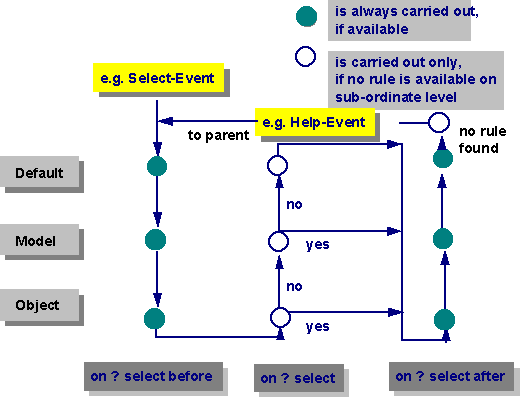
If an event occurs, the IDM begins searching gradually for suitable events. In doing so, the IDM searches first for rules beginning with before in the corresponding object default. Then the IDM looks for rules belonging to the object models. Finally, the IDM checks at the object itself whether there is a defined before rule. In the meantime all found rules are being processed.
Afterward the IDM searches for a normal rule with the object and, if no objects can be found, the IDM advances to the corresponding model. If, however, a rule has been defined for the occurred event, the IDM will not search for a model. At the model the IDM checks whether a suitable rule has been defined. If this is the case, the rule will be processed and the search will be broken up.
Finally the IDM restarts searching for event rules at the object; this time, however, it searches for events marked by the keyword after. From the model the IDM advances to the corresponding model or default to search for rules. In doing so, all found rules will be processed.
There is a deviation from this scheme for the rules which are bound to key events (key) and help events (help). For these events the IDM searches for rules also at the object parent, if no suitable rule could be found during the whole searching procedure. In doing so, a help system in form of a rule can be bound very easily by defining a corresponding rule in the dialog.
The following diagram illustrates the search for rules. In this picture a model directly derived from the default is assigned to the object.
Example
For a window object the following four rules are defined:
- on WINDOW close before
- on Window1 close
- on WINDOW close
- on Window1 close after
The order thus is: 1-2-4.
Rule 3 will never be processed due to rule 1.
Supposing that for a pushbutton the following five rules have been defined:
- on PUSHBUTTON select
- on OKButton select
- on PUSHBUTTON select after
- on OKButton select before
- on OKButton select after
The order then is: 4-2-5-3.
Rule 1 will never be processed due to rule 2.
As an example we can mention here a system for the data input. In this system many windows are defined which process the contents through an OK button and which ignore the contents by a Cancel button. After pressing either of the two buttons the window is closed.
The rules can be defined so that a rule which closes the corresponding window is bound to the model of the Cancel button. Doing the same for the OK button is more difficult, since a window-specific processing has to come first. The following method can be used:
Each instance of the OK button is bound to a rule which calls the current function and the model of the OK button is bound to an after rule which always closes the window. In this way, the closing of the window will be centrally and does not always have to be programmed.
 Support