1
Correlations between attributes
1.1
Standard attributes
The .visible and .sensitive attributes specify the visibility and accessibility of an object from the user's point of view. Since the actual visibility/reachability of an object also depends on the respective parent object, the attributes .real_visible and .real_sensitive can be used to query the current, actual visibility/reachability of an object. This can be particularly useful when setting the focus via .focus, since setting the focus on invisible or unreachable objects leads to error messages.
As a special feature the attribute .mapped is available. It determines whether an object is already drawn visibly or not, when the .visible attribute of this object is set to true. If .mapped is false and .visible is true, operations with this object are already permissible in the invisible condition, which otherwise could only be executed at a visible object.
In order to display a help text in a status bar of a window when the mouse cursor hovers over an object, the text is specified in the attribute .statushelp at the respective object. The same applies to the popping up help texts (tooltip) which are specified in the attribute .toolhelp. In addition, any help texts can be specified in the attribute .help, whereby the programmer himself is responsible for the display.
To use keyboard shortcuts that are intended to trigger a select event on an object, the respective key combination is first defined as a resource and then assigned to the object via the .accelerator attribute.
1.2
Hierarchical attributes
Hierarchical attributes are used to indirectly access objects within the parent-child hierarchy.
While the .groupbox, .notepage, .control, .window, .toolbar, and .dialog attributes reference the next object of the corresponding class upward from the current object, .parent refers to the direct parent object.
Also, within child objects, .child[integer] can be used to reference a direct child of an object, where .childcount specifies the total number of direct children.
Menus, records and subcontrols take a special position and can be referenced with the attributes .menucount and .menu[integer], .recordcount and .record[integer], .subcontrolcount and .subcontrol[integer], according to the direct children. These object classes are not referenced via .child[integer]!
1.3
Geometric attributes
Calculating the position of an object
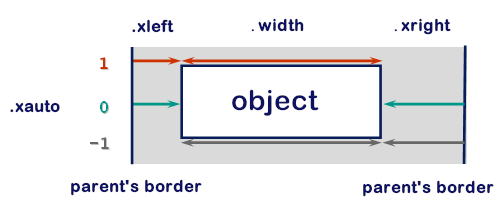
To calculate the position of an object, the attributes .xauto, .xleft, .width and .xright or .yauto, .ytop, .height and .ybottom are necessary. The alignment is always defined relative to the parent object. In each case, two positional values are specified and the third is calculated. The attributes .xauto and .yauto control which values are specified and which value is calculated.
The graphic illustrates this as an example for the X direction, the same applies for the Y direction.
The attributes .posraster and .sizeraster indicate whether the set values correspond to raster or pixel values. If one or both attributes are set to true, the underlying raster is determined via the attributes .xraster, .yraster and .reffont.
Additional geometric attributes
Windows and toolbars have the additional geometric attributes .minheight, .minwidth, .maxheight and .maxwidth. They can be used to define the limits within which the size of the object can be changed interactively (by dragging it with the mouse).
Objects, whose content can be larger than the available display area, have additional geometric attributes, that define their virtual size and the visible section of the content. The .vheight and .vwidth attributes define the virtual height and width of the object. To display the non-visible parts, a user must scroll the object. Thereby the visible section is controlled by the attributes .xorigin and .yorigin. They define the relative translation of the object origin, i.e. the position of the visible area on the larger virtual area of the object. Normally, the object origin is located in the upper left corner of the object.
The .xraster and .yraster attributes define the horizontal and vertical units in which the position and dimension of the children are specified. The coordinates of the children in pixels are obtained by multiplying the specified coordinates (in raster units) by the raster factors .xraster and .yraster.
The .reffont attribute can be used to link the specification of the raster units to the character set used. The DM then calculates the values .xraster and .yraster itself.
Borderless geometry
To make the geometry behavior of objects with borders configurable, there is the attribute .borderraster. It can be used to specify that the geometry of the object is calculated as if it had no border.
Geometric attributes for high resolution screens
Pixel based values of geometric attributes are transformed by the IDM to match the scaling factor of the system in order to ensure a representation consistent with the system settings. The geometric units are set in IDM pixel values or raster as before. The IDM pixel values are internally extrapolated and converted into real pixel values according to the scaling factor. This conversion happens in both directions. Raster values are either linked to the used (HighDPI capable) character set or are set in IDM pixel values and then scaled. Raster units can also be resolved to IDM pixel values based on the underlying font.
The .propscale attribute controls whether the horizontal and vertical raster should be set proportionally to the maximum value, which is determined by the value calculation of xraster and yraster of the font raster. The exact calculation of the raster is described in the chapter “Calculating the Grid Size from a Reference Font” of the font resource.
See also
1.4
Scrollbar attributes
Some objects, e.g. window, groupbox and notepage, can have scrollbars (sliding bars) that can be used to move the displayed contents of the object horizontally and vertically. The scrollbar attributes define the display and behavior of the scrollbars.
There are the following scrollbar attributes:
- .hsb_linemotion
- .hsb_optional
- .hsb_pagemotion
- .hsb_visible
- .vsb_linemotion
- .vsb_optional
- .vsb_pagemotion
- .vsb_visible
Attributes starting with .hsb_ refer to the horizontal scrollbar and attributes starting with .vsb_ refer to the vertical scrollbar.
The visibility of scrollbars is influenced by the following attributes:
- .hsb/vsb_optional
- .hsb/vsb_visible
- .width/height
- .vwidth/vheight
The following rules apply:
- An object can have a horizontal scrollbar only if its virtual width .vwidth is set and is >0.
- An object can have a vertical scrollbar only if its virtual height .vheight is set and is >0.
If no scrollbars are set, the virtual size is ignored.
The attributes .hsb/vsb_visible and .hsb/vsb_optional control whether the scrollbars should be visible all the time or only when they are needed.
As mentioned above, scrollbars require the virtual size to be set, i.e. if no virtual size is set, scrollbars are not available.
When the scrollbars are visible, and
-
.hsb/vsb_optional = true
=> the scrollbar will only be visible when it is really needed.
-
.hsb/vsb_optional = false
=> the scrollbar is always visible.
Remark
In the Motif version .hsb/vsb_optional is ignored, i.e. internally .hsb/vsb_optional is implicitly always set to true.
To query or change the position of the scrollbar slider, the .xorigin and .yorigin attributes must be used. These two attributes specify the displacement of the actual object origin.
The .hsb/vsb_linemotion and .hsb/vsb_pagemotion attributes define by how many units .xorigin or .yorigin - and thus the object content - should be moved during the respective scroll action. Units are either raster units or pixels, depending on whether .sizeraster is set for the object or not. The value 0 means that the default value of the system is taken. For .hsb/vsb_pagemotion, scrolling is then done page by page.
There are objects, e.g. the listbox, which display scrollbars if their content does not fit into the existing display area, but which do not have scrollbar attributes. For these objects, the scrollbars are controlled by the window system and cannot be influenced by the ISA Dialog Manager.
1.5
Layout attributes
The background color of an object is determined by assigning a color resource to the .bgc attribute. For the foreground color, i.e. usually the color of the text within an object, the color resource is specified in the .fgc attribute.
The type of font representation is done by assigning a font resource to the .font attribute to the respective object.
Objects, that can display images get these assigned to the .picture attribute as a tile resource. This attribute is indexed with integer values if it is a list object (e.g. treeview).
Layout attributes of the image object
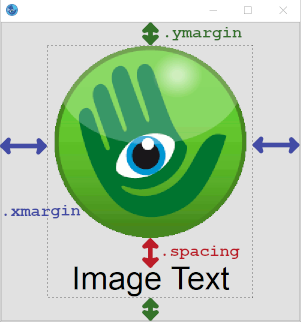
For the image object, the .xmargin and .ymargin attributes define the spacing between the image border and the display area. The attribute .spacing, on the other hand, defines the distance between tile and text within the display area of the image. The following graphic illustrates the combination of said attributes:
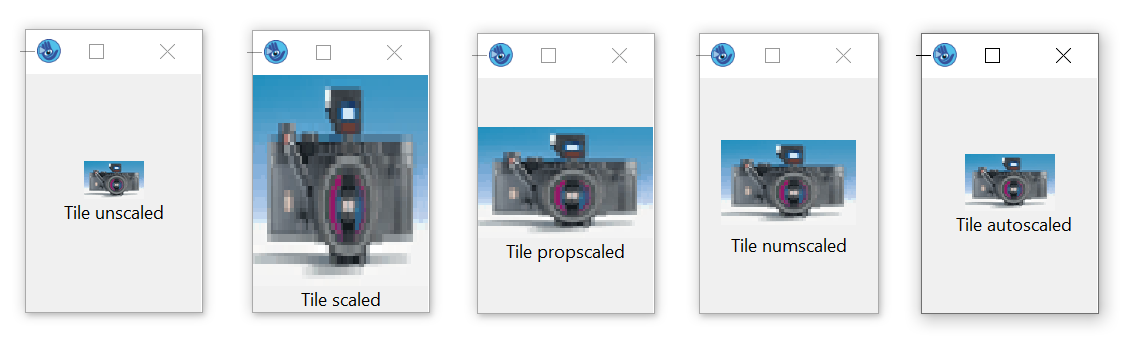
The .scalestyle attribute can be used to specify the type of scaling of the tile within the display area. The following graphic illustrates the available scaling styles:
Layout attributes for high resolution screens
The .tiledpi attribute of the setup object can be used to specify the DPI resolution for which the application's tiles are designed. The size of an image or pattern is then converted to the currently valid DPI value based on the.tiledpi.
See also
1.6
Text attributes
The title bar of a window and the title of a menu box are specified in the .title attribute. For all other texts to be displayed, the .text and .content attributes are used. An object usually uses only one of these attributes. Thus, the .content attribute applies only to edit text and list objects, indexed for the latter.
The Poptext / Combobox object has a special position. Here, the list content is accessed via .text[integer], at the same time, read access to the currently displayed text is also supported with .content. Since write access to .content depends on the value in the .style attribute (poptext, edittext, listbox) of the poptext, the attribute and object description must be observed here.
 Support