9 dmw_dial
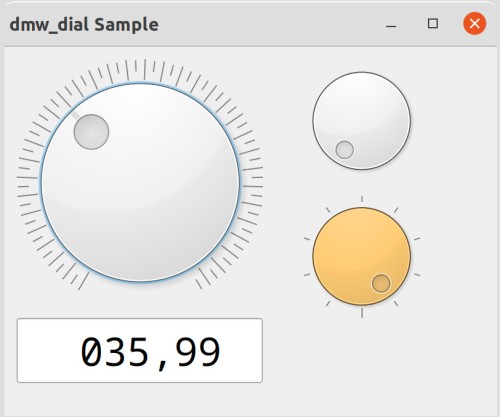
dmw_dial represents a rotary control with defined minimum and maximum values - similar to a volume control. It is comparable to the scrollbar object, but with a different visual form and the ability to rotate. dmw_dial is operated via the keyboard or a "grip" (a dot on the control).
You can define a value range and configure a scale with lines.
As is common in responsive applications, direct feedback (e.g., the display of the set numerical value) can be implemented when continuously rotating the handle recess or pressing the button and before releasing it.
Definition
{ export | reexport } { model } dmw_dial { <Identifier> }
{
<standard attributes>
<hierarchy attributes>
<layout attributes>
<>
<object-specific attributes>
}
9.1 Special features
The set controller value can be changed as follows:
- Clicking jumps to the value closest to the click point.
- Grasping and moving the handle recess.
- The cursor keys Left/Right/Up/Down move you through the lines. The Page Up/Page Down keys move you through the pages..
- The Home/End keys jump to the minimum/maximum value.
The delta values for line-by-line and page-by-page jumps can be set using the attributes .linemotion and .pagemotion. This allows for two different jump distances to be implemented for navigation using cursor keys.
Marker lines can be turned on and off (attribute .notchvisible) and are also affected by their size. The number of lines can be varied by specifying a spacing value between them (attribute .notchspan). However, the exact appearance is determined by the object and cannot be further modified.
Instead of fixed stops for minimum and maximum values, the rotary control can also be configured without stops. In this case, the control can be rotated 360° and then jumps from the maximum to the minimum value, or vice versa. The markings then extend around the entire 360° of the control.
Two events allow us to respond to user interaction:
- The select event is generated when the mouse is clicked or the mouse button is released, as well as when the cursor keys are pressed.
- The move event is sent when the controller is continuously moved/rotated while the mouse button is held down.
A rule-based response to the select event is sufficient in most cases.
Events
Children
doccursor
document
menubox
record
transformer
Parent
groupbox
layoutbox
notepage
splitbox
toolbar
window
Menu
9.2 Availability
dmw_dial is available since IDM Version A.06.03.e for QT platforms and part of the USW option.
9.3 Special features
Distances between notches
The default value for the spacing between the drawn scale lines is 3.7. However, this value can be changed.
Geometry and Layout
The object has no border and is not vertically centered in a grid, as is the case with single-line objects like pushbutton or statictext. If the width or height is 0, the default size of 100px is used.
Setting the background color (.bgc) affects the background color of the slider. The surrounding background - around the slider - cannot be set on the object itself. The background color of the parent object will appear here.
9.4 attributes
9.5 object-specific attributes
| Attribute | Data Type | Value Range | Properties | Short Description |
|---|---|---|---|---|
|
integer |
Default: 0 |
S/G/CEv/Inh |
This attribute defines the set controller value |
|
|
integer |
Default: 1 |
S/G/CEv/Inh |
This attribute defines the value difference for "line-like" adjustments of the value using the cursor keys |
|
|
integer |
Default: 0 |
S/G/CEv/Inh |
This attribute defines the minimum possible controller value. |
|
|
integer |
Default: 100 |
S/G/CEv/Inh |
This attribute defines the maximum possible controller value. |
|
|
integer |
Default: 0 |
S/G/CEv/Inh |
This attribute defines the spacing of the marker lines in 1/10 pixels. |
|
|
boolean |
Default: true |
S/G/CEv/Inh |
This attribute defines the visibility of the marker lines drawn around the slider. |
|
|
integer |
Default: 10 |
S/G/CEv/Inh |
This attribute defines the value difference for "page-by-page" rules of the value. |
|
|
boolean |
Default: false |
S/G/CEv/Inh |
Controller with or without fixed stop |
9.6 Events
The scroll event signals an interactive change to the slider by the user. This event is generated as soon as a click occurs in the dmw_dial object and the mouse button is released. It is irrelevant whether the current value changes. The event is also generated when the cursor keys are pressed. The current value at the time the event is generated can be retrieved from the .value attribute of the thisevent object. The .curvalue attribute contains the current value at the time the rule is executed.
This event is generated in addition to the scroll event when a value change occurs while the mouse button is held down. The .value attribute of the move event contains the "current" value at the time the event was generated. The .curvalue attribute, on the other hand, contains the current value at the time the rule is executed.
A rule-based response to the select event is sufficient in most cases.
9.7 Remarks
Incorrect valuation
The procedure in case of violation of.minvalue <= .curvalue <= .minvalue is undefined. No value change is performed in the event of a consistency violation.
Support
The following attributes are present in the dmw_dial, but have no effect:
9.8 Example
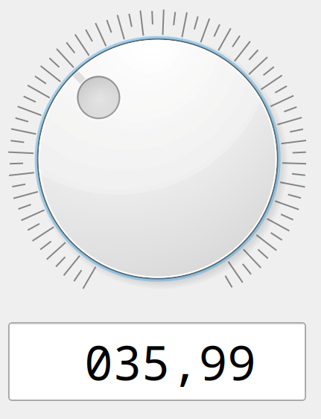
The following dialog fragment shows the code for implementing a (temperature) controller with values between -20.00 °C and +120.00 °C.
To enable accuracy in 1/100 increments, the minimum and maximum values are multiplied by 100.
The set value is then displayed in EtTemp with two decimal digits.
dmw_dial DiTemp {
  .xleft 10;
  .ytop 10;
  .width 200;
  .height 200;
  .minvalue -2000;
  .maxvalue 12000;
  .curvalue 2000;
  .notchspan 150;
  .notchvisible true;
  .datamodel EtTemp;
  .dataoptions[dopt_apply_on_event] true;
  .dataset[.curvalue] .content;
}

edittext EtTemp
{
  .editable false;
  .xleft 10;
  .width 200;
  .ytop 220;
  .format "%005,02d";
  .alignment 0;
}
 Support