10 dmw_moviebutton
Definition
{ export | reexport } { model } dmw_moviebutton { <Identifier> }
{
<standard attributes>
<hierarchy attributes>
<layout attributes>
<>
<object-specific attributes>
}
The dmw_moviebutton object is an optional object provided by the optional USW option for the IDM for Qt. It allows the display of an animated GIF or SVG file. The underlying functionality is provided by the system's Qt libraries, which only support the static features of "SVG Tiny 1.2" for SVG files.
Displaying a non-animated GIF or SVG file is also possible. In this case, the .real_animated attribute has the value false.
10.1 Availability
The dmw_moviebutton class is only available in the IDM for Qt. However, for the IDM platforms with Qt 5.11 and Qt 5.15, there is no support for starting/stopping/pausing an SVG animation.
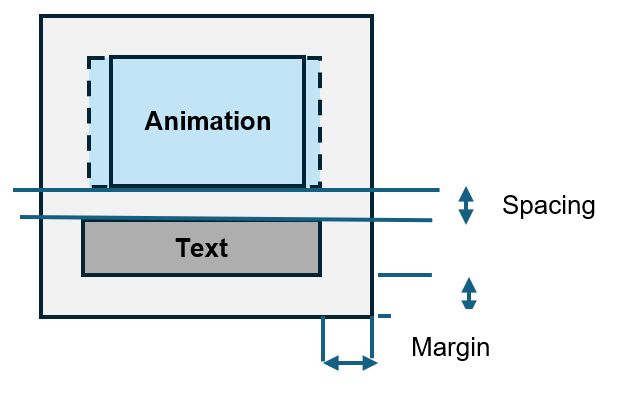
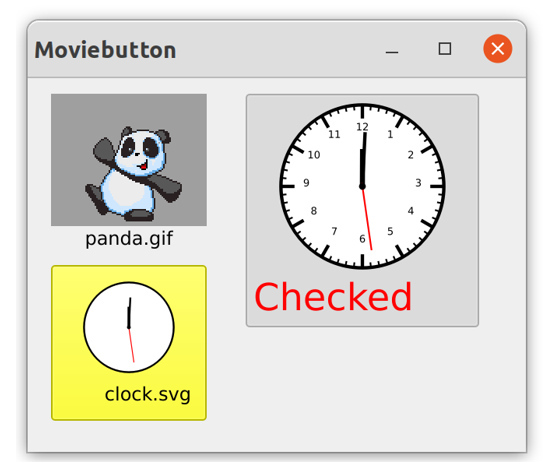
The object is designed as a kind of "pushbutton" and allows text to be displayed below the image/animation. Alternatively, a "Checked" true/false state, similar to a checkbox, is also possible. The object's border, the animation scaling, and the spacing between the border, text, and animation area are all adjustable.
An animation typically repeats continuously. It can be started and stopped using the .play attribute. The animation can be paused using the .paused attribute.
There are additional control options for GIF animations. The number of frames can be queried, and a specific frame can be displayed. Additionally, the number of repetitions can be set using the .loopcount attribute.
The start and finish events are used to signal the initial start and end of the animation when the set number of repetitions is reached. No events are generated while the animation is paused.
Events
Children
doccursor
document
menubox
record
transformer
Parent
groupbox
layoutbox
notepage
splitbox
toolbar
window
Menu
10.2 Functional Differences / Malfunctions
IDM for Qt-5: Starting/stopping an SVG animation is not possible. It continues to run normally. Dynamically implementing .play or .paused will generate a warning.
IDM for Qt-6: While it is possible to start/stop/pause an SVG animation, a repaint triggered by other circumstances usually leads to the next frame of the animation.
10.3 Geometry
The dmw_moviebutton object is primarily used to display an animation. Therefore, it is not a row object and has a default size of 100 pixels in width and height.
10.4 Scaling
Two attributes control the animation's scaling: .scale and .scalefactor. The latter specifies the scaling as a percentage of the screen's scaling. Scaling always maintains the original aspect ratio.
| .scale | .scalefactor | Scaling |
|---|---|---|
|
false (Default) |
0 (Default) |
Animation is displayed unscaled. |
|
true |
0 (Default) |
Scaling to the maximum possible space |
|
true |
100 |
Animation is displayed in the default size according to the screen scaling. |
|
true |
1..99 |
Animation is displayed in a reduced size. |
|
true |
>100 |
The animation is displayed enlarged by a percentage. 200 corresponds to 200%, i.e., double the width/height. |
Please note that to ensure proper functionality for GIF animations, these are fully cached. Rescaling the image will cause the GIF animation to be reloaded to guarantee consistent rendering.
10.5 attributes
Not supported are the attributes .source, .target, .accelerator und .active.
10.6 object-specific attributes
| Attribute | Data Type | Value Range | Properties | Short Description |
|---|---|---|---|---|
|
integer |
-1,0.1; Default: 0 |
S/G/C/F/Inh |
This attribute defines the horizontal alignment of the single-line text. |
|
|
boolean |
Default: false |
S/G/C/F/Inh |
This attribute is used to turn the frame of the dmw_moviebutton object on or off. |
|
|
boolean |
Default: false |
S/G/C/F/Inh |
Determines whether an object has an on/off activation state, such as a checkbox. Defines the behavior of the dmw_moviebutton. It can be used as a "button" or a "checkbox". The former is intended to react to a "button press". The latter is used as a switch with the states Inactive/Active. This state can be queried via the .checked attribute. |
|
|
boolean |
Default: false |
S/G/C/F/E/Inh |
This attribute defines whether the dmw_moviebutton object is displayed as active (.checked=true) or inactive (.checked=false). This attribute only takes effect if the .checkable attribute is set to true. |
|
|
Font |
default: null |
S/G/C/F/Inh |
Font of the text |
|
|
integer |
Default: 0 |
S/G/C/F/Inh |
This attribute returns the currently displayed frame for GIF animations. For a paused animation, it can also be used to simply set the displayed frame. Values between 1 and <.framecount> are allowed. |
|
|
integer |
Default: 0 |
G |
This attribute returns the number of frames in a loaded GIF animation. It only returns one consistent value for a loaded and visible animation. |
|
|
integer |
Default: 0 |
S/G/C/F/Inh |
This attribute allows you to specify the number of repetitions for a GIF animation. It has no effect on SVG animations. Once the specified number of repetitions is reached, the animation stops automatically. A finished event is then sent, and the .play attribute changes to false. For an infinite repetition of the animation, set this attribute to 0. |
|
|
integer |
>=0, Default: 0 |
S/G/C/F/Inh |
This attribute defines the distances in pixels between the text and the animation and the outer boundaries of the object. |
|
|
string |
Default: "" |
S/G/C/F/Inh |
This attribute defines the file path to the animation. GIF/SVG files are allowed. A file extension ".svg" indicates an SVG file. Path resolution via environment variables or the tilde (~) symbol is supported. The animation file is loaded when the dmw_moviebutton object is made visible or its attributes are changed, and depending on the values of the .play/.paused attributes, it may also play immediately. |
|
|
boolean |
Default: true |
S/G/C/F/E/Inh |
This attribute controls the animation. It starts (.play=true) or stops (.play=false) the animated display. If the dmw_moviebutton object is visible, a start or finish event is sent when its state changes. When playing a GIF animation, the change to .play=false occurs as soon as the number of repetitions (attribute .loopcount) is reached. Controlling the animation of SVG animations with Qt-5 is not possible. It will run endlessly. A WSI warning will be issued when dynamically changing this attribute in the visible state. |
|
|
boolean |
Default: false |
S/G/C/F/Inh |
Setting this attribute to true pauses any running animation. Events such as start or finish are not generated. To display a single frame of a GIF animation, the animation should be paused before using the .frame attribute. Controlling the animation of SVG animations with Qt-5 is not possible. It will run endlessly. A WSI warning will be issued when dynamically changing this attribute in the visible state. |
|
|
boolean |
Default: false |
G |
This attribute can be used to query whether the file defined in the .path attribute has a valid and supported format and can be animated by the dmw_moviebutton object. |
|
|
integer |
Default: 0 |
G |
This attribute can be used to query whether the file defined in the .path attribute has a valid and supported format and can be animated by the dmw_moviebutton object. This attribute provides the default/original width for a loaded valid animation file. |
|
|
integer |
Default: 0 |
G |
This attribute provides the default/original height for a loaded valid animation file. |
|
|
boolean |
Default: 0 |
G |
This attribute can be used to query whether the animation defined in the .path attribute could be loaded and has a supported format. |
|
|
boolean |
Default: false |
S/G/C/F/Inh |
This attribute enables animation scaling. When enabled, the scaling factor is set via the .scalefactor attribute. |
|
|
integer |
0...100; Default: 0 |
S/G/C/F/Inh |
Animation scaling is always applied proportionally to the width and height to maintain the original aspect ratio. The scaling factor defines the relative reduction/enlargement in percent. A value of 0 has a special meaning and is used to perform maximum scaling according to the available space. |
|
|
integer |
>=0; |
S/G/C/F/Inh |
This attribute defines the distance between text and animation in pixels. It is ignored if there is no animation or text. |
|
|
integer |
0..100 |
S/G/C/F/Inh |
The playback speed of GIF animations can be adjusted. The .speed attribute allows you to set it as a percentage of the original speed. |
|
|
Text |
Default: null |
S/G/C/F/Inh |
Text displayed below the animation This attribute defines the single-line text that is displayed below the animation. Mnemonics are not supported. |
Events
select
The select event is always triggered when a mouse click occurs within the selected object. The click can be within the animation, the text, or the space between them. The select event can also be triggered by pressing the spacebar on the selected object.
dbselect
The dbselect event is also triggered when a double-click occurs within the sensitive object. This could be within the animation, the text, or the space between them.
start
The start event is always triggered when an animation of the visible object begins. This happens either when the object is made visible with .play=true or when the .play attribute changes from false to true. A paused animation (.paused=true) does not generate any start or finish events.
finish
The finishevent is triggered when a running animation is stopped. This occurs when the animation's loop count (attribute .loopcount) is reached or when the animation is terminated by setting .play:=false. No event is triggered in pause mode (.paused=true).
activate
If the object is configured as toggleable (attribute .checkable=true), the activate event is triggered as soon as the user interactively changes the activation state (attribute .checked) from false to true. The activation change can be done by clicking on the object or by pressing the spacebar on the focused object.
deactivate
If the object is configured as toggleable (attribute .checkable=true), the deactivate event is triggered as soon as the user interactively changes the activation state (attribute .checked) from true to false. The activation change can be made by clicking on the object or by pressing the spacebar on the focused object.
Attention
key, cut und paste Events are NOT supported by the dmw_moviebutton.
10.7 Example
The example plays a GIF animation and stops after 10 repetitions. Clicking the animation pauses it until it is clicked again.
dialog Dwindow Wi {
  .title "GIF Animation";
  dmw_moviebutton MovB {
    .xauto 0;
    .yauto 0;
    .path "~:dog_run.gif";
    .scale true;
    .text "Dog run";
    .spacing 10;
    .checkable true;
    .loopcount 10;
    on select {
      this.pause := this.active;
    }
  }
  on close {
    exit();
  }
}
 Support