11 dmw_webview
The optional dmw_webview object is part of the USW option of the IDM for Qt. It is used to display web pages and HTML text.
Definition
{ export | reexport } { model } dmw_webview { <Identifier> }
{
<standard attributes>
<hierarchy attributes>
<layout attributes>
<>
<object-specific attributes>
}
Since loading a web page can take some time, this is signaled by the start and finish events. Detailed loading progress is accessible via the .progress attribute as a percentage value between 0 and 100. Reported errors can be read in the .errormsg attribute.
The readability of the page can be ensured or configured via a scaling factor in percent (%).
To load a web page, you can use the .url attribute or the :load() method. Instead of specifying a URL, you can also display HTML text directly using the .html attribute. If the loading process takes too long, you can stop it using the :stop() method. You can also restart the page at any time by calling :reload().
Changes to the attributes .html, .progress, .title and .url by the web engine are signaled by a changed event.
The :runscript() method is used to execute your own JavaScript code.
If you want to react to the opening of a link with a named window reference target, you should react to the open event.
During interaction with the web page, scroll and resize events provide information about the visible topmost area of the page..
The text selected by the user is passed to the object via the select event along with the .selected_string attribute. However, programmatic text selection using the :findtext() method is not possible. This method is used to highlight text on the page.
When the mouse moves over a link or a link receives keyboard focus, a signal is triggered via the move event..
Numerous settings further control the behavior of browser functionality. These include:
-
Allows muting the audio of a webpage. (attribute .audio_muted)
-
Allow full-screen display (attribute .allow_fullscreen)
-
Allow screenshots (attribute .allow_screencapture)
-
Allow downloads/file access (attributes .allow_download and .allow_fileaccess)
-
Enable the browser's default menu (attribute .allow_stdmenu)
-
Disable JavaScript messages (attribute .disable_messages)
-
Allow access despite certificate errors (attribute .accept_certerror)
The browser also has a built-in history. The attributes .history_count, .history_curitem, .history_url, and .history_title, as well as the methods :clearhistory(), :forward(), and :backward(), are available for controlling the page history. The history is only consistent while the object is visible and is otherwise empty.
The iconify and deiconify events are used to handle the switching between normal and full-screen display. The .allow_fullscreen attribute must first be set to true.
Finally, the displayed HTML content can be saved locally as file(s) using the :save() method.
11.1 Special features
Displaying a page via URL or HTML content is not possible when editing in the IDM Editor. Likewise, no specific events are generated.
Attention
The dmw_webview object cannot be interactively moved or resized in the editor's design view, as evidenced by the absence of a move/resize cursor. Similarly, single and double clicks do not work (for selection or directly opening properties). This must be done via the object browser or the geometry properties.
11.2 Events
Children
Parent
Menu
11.3 attributes
Not supported are the attributes .source, .target, .accelerator, .active, .cut_pending, .fgc and .bgc.
11.4 object-specific attributes
The webview object has the following specific attributes:
| Attribute | Data Type | Value Range | Properties | Short Description |
|---|---|---|---|---|
|
boolean |
Default: false |
S/G/Chg/Inh |
Allows pages to load despite certificate problems |
|
|
boolean |
Default: false |
S/G/Chg/Inh |
Allows file downloads |
|
|
boolean |
Default: false |
S/G/Chg/Inh |
Allows fullscreen display |
|
|
boolean |
Default: false |
S/G/Chg/Inh |
Allows screenshot creation |
|
|
boolean |
Default: false |
S/G/Chg/Inh |
Allows the browser's default menu |
|
|
boolean |
Default: false |
S/G/Chg/Inh |
Mutes the displayed page |
|
|
boolean |
Default: false |
S/G/Chg/Inh |
Disables JavaScript messages |
|
|
string |
Default: "" |
G |
Error message of the last Action |
|
|
integer |
Default: 0 |
G/Chg |
Number of matches found by the :findtext() call (Qt-6 only) |
|
|
integer |
Default: 0 |
G/Chg |
Active highlighted matches found by the :findtext() call (Qt-6 only) |
|
|
integer |
Default: 0 |
G |
Sets/Returns the number of pages in the history |
|
|
integer |
Default: 0 |
G |
Sets/Returns the number of pages in the history |
|
|
string |
Default: "" |
G |
Returns the page title of a history entry |
|
|
string |
Default: "" |
G |
Returns the saved URL of a history entry |
|
|
string |
Default: "" |
S/G/Chg/Inh |
Defines the HTML code to be displayed |
|
|
string |
Default: "" |
G/Chg |
Returns the URL of the icon associated with the web page |
|
|
integer |
Default: 0 |
G/Chg |
Returns the page loading progress as a percentage |
|
|
integer |
Default: 0 |
G |
Virtual page height |
|
|
integer |
Default: 0 |
G |
Virtual page width |
|
|
integer |
Default: 0 |
G |
Left position of the displayed page area |
|
|
integer |
Default: 0 |
G |
Top position of the displayed page area |
|
|
integer |
Default: 0 |
G |
Defines the Display scale factor |
|
|
string |
Default: "" |
G |
Returns the selected text on the page |
|
|
string |
Default: "" |
G |
Returns the title of the web page |
|
|
string |
Default: "" |
S/G/Chg/Inh |
Defines the URL of the loaded/current web page |
Events
This event is triggered when a text selection changes. That is, when the user selects text on the web page, or when the text selection changes. This can happen via mouse (highlighting, clicking, double-clicking, etc.) as well as via keyboard. The selected text can be queried using the .selected_string attribute. An empty string indicates that no text is selected.
This event is triggered as soon as a web page starts loading. This can happen by changing the .url attribute, making the object visible, following a link, or by calling the :load() or :reload() method. The .progress attribute is initially set to 0 when loading starts. A successful and completed load is indicated by the finish event.
The completion of a web page's loading process is indicated by the finish event. The .progress> attribute then displays the complete loading status as 100%. If the .errormsg attribute is not an empty string, a loading error or abort has occurred.
A web page's request for a new named window is communicated to the object via the open event. The .value attribute of the thisevent object provides details about the request, including the target destination, user trigger, desired coordinates and size, and of course, the URL.
The information contained therein can therefore be used by the dialog developer to, for example, configure a new instance of the dmw_webview object and open the specified URL.
Note
This event is only generated by the IDM for Qt 6. The Qt 5 version does not allow an action to open a new web page in a new window. Following a link in the same view does not generate an open event.
A user-initiated scrolling of the displayed area (at the top level) has occurred. The attributes .real_xorigin or .real_yorigin have changed on the object. It's important to remember that HTML pages can contain multiple nested areas with scrollbars, which don't necessarily transmit a virtual size or display position to the outside.
Resizing the page content causes the virtual display size to change. This triggers a resize event and modifies the attributes .read_vwidth, or .real_vheight.
It should be noted that HTML pages can have several nested areas with scrollbars, which do not transmit any virtual size or display position to the outside.
Das move-Ereignis wird ausgelöst sobald die Maus über einen Link gestellt oder Fokuswechsel auf einen Link passiert. Im .value-Attribut des thisevent-Objektes kann die URL dieses Links erfragt werden.
When the mouse is moved away from the link, so that there is no link at the mouse position, a move event is triggered in which the .value attribute is empty.
This event is sent to the object when a full-screen display of the web page is requested. It is up to the IDM application to respond to it or ignore the request.
The attribute .allow_fullscreen should be set to true to signal full-screen support to the web page.
This event is sent to the object when a request is made to exit the full-screen display of the web page. It is up to the IDM application to respond to this request or ignore it.
The attribute .allow_fullscreen should be set to true to signal full-screen support to the website.
See deiconify Event.
11.5 Methods
| Method | Datentyp | Parameter | Description |
|---|---|---|---|
| :action() |
void |
(string ActionString) |
Executes an action on the web page |
| :backward() |
void |
() |
Go backwards in the page history |
| :clearhistory() |
void |
() |
Clears the page history |
| :findtext() |
void |
(string Text) |
Finds and highlights the given text nn the web page |
| :forward() |
void |
() |
Go forward in the page history |
| :load() |
void |
(string Url) |
Load a web page from the goven URL |
| :reload() |
void |
() |
Reload of the web page |
| :runscript() |
void |
(string Script) |
Running a JavaScript |
| :save() |
void |
(string Filename {, integer Format}) |
Saves the web page as file(s) |
| :stop() |
void |
() |
Forces a stop of loading a web page |
11.6 Availability
The IDM platform RHEL10 / x86_64 / Qt-6.9 as well as RHEL9.6 / x86_64 / Qt-5.15 support the dmw_webview object. For an IDM application, the USW option is required, and the library file IDM_HOMEDIR:uswclasses/libIDMuc_webview.so should be present in the USW search path. Additionally, the libraries libQtWebViewEngine.so and libQtWebViewCore.so must be installed on the Linux system. This is typically done by installing the packages qt6-qtwebengine (or qt5-qtwebengine for RHEL9) from the EPEL repository.
The installed Qt WebEngine, currently based on Chromium, is responsible for the functionality and compliant HTML display, as well as the supported protocols. The current version of the dmw_webview class also has the use of browser plugins disabled for security reasons.
The Qt WebEngine generates some messages that are not written to the log and trace files of the IDM application. These include messages from the JavaScript engine, which can be disabled by setting the .disable_messages attribute to true. Chromium also writes messages, which can be disabled via an environment variable. To do this, the environment variable QTWEBENGINE_CHROMIUM_FLAGS must be set to --disable-logging. This can also be done before the first use of dmw_webview via the rule language.
11.7 Example
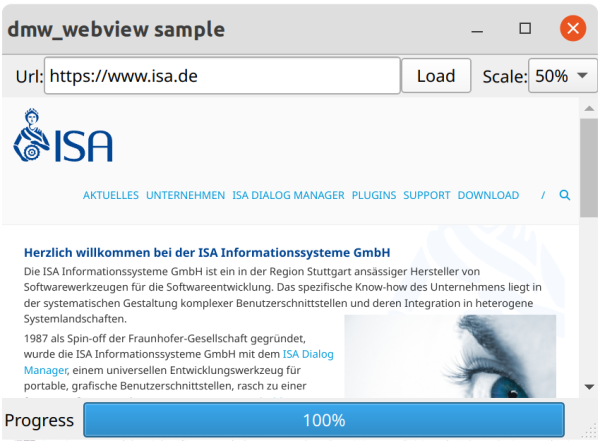
Pressing the "Load" button loads the page specified via URL.
dialog Dlg
window WiWebViewSample
{
  .title "dmw_webview sample";
  statictext { .text "Url:"; .width 30; .alignment -1; }
  edittext EtUrl {
  .content "https://www.isa.de";
  .xauto 0; .xleft 30; .xright 140;
  }
  pushbutton PbLoad {
    .text "Load";
    .width 50; .xauto -1; .xright 90;
    on select {
      WebV:load(EtUrl.content);
      WebV.scalefactor := PtScale.activedata;
    }
  }
  statictext {
    text "Scale:"; .alignment -1;
    .xauto -1; .xright 50; .width 40;
  }
  poptext PtScale {
    .text[1] "50%"; .userdata[1] 50;
    .text[2] "100%"; .userdata[2] 100;
    .text[3] "200%"; .userdata[3] 200;
    .xauto -1; .ytop 2; .width 50;
  }
  dmw_webview WebV {
    .ytop 30; .xauto 0; .yauto 0;
    on start {
      StStatus.text := "Loading";
    }
    on finish {
      StStatus.text := "Done";
    }
  }
  statusbar StatB {
    statictext StStatus { .text "Progress"; }
    progressbar PgProgress {
    .datamodel WebV; .dataget .progress;
    }
  }
  on close {
    exit();
  }
}
 Support